Assess Needs
Planning → Assess needs (or Intake → Assess needs where the Intake step is on) is where a project’s size is decided from the decision itself, not from habit or from whoever shouts loudest. It takes the approach Project Context concluded and asks plain questions about effects. The result is a judgment with its reasons, the obligations reviewed, and, where your organization has a playbook, the plays that fit it.
If you skip this: every project gets the engagement its team is used to. Small decisions get surveys nobody needed; serious ones get two weeks and a web page. Sizing from the effects, before any method is chosen, is what makes the effort proportionate and defensible.
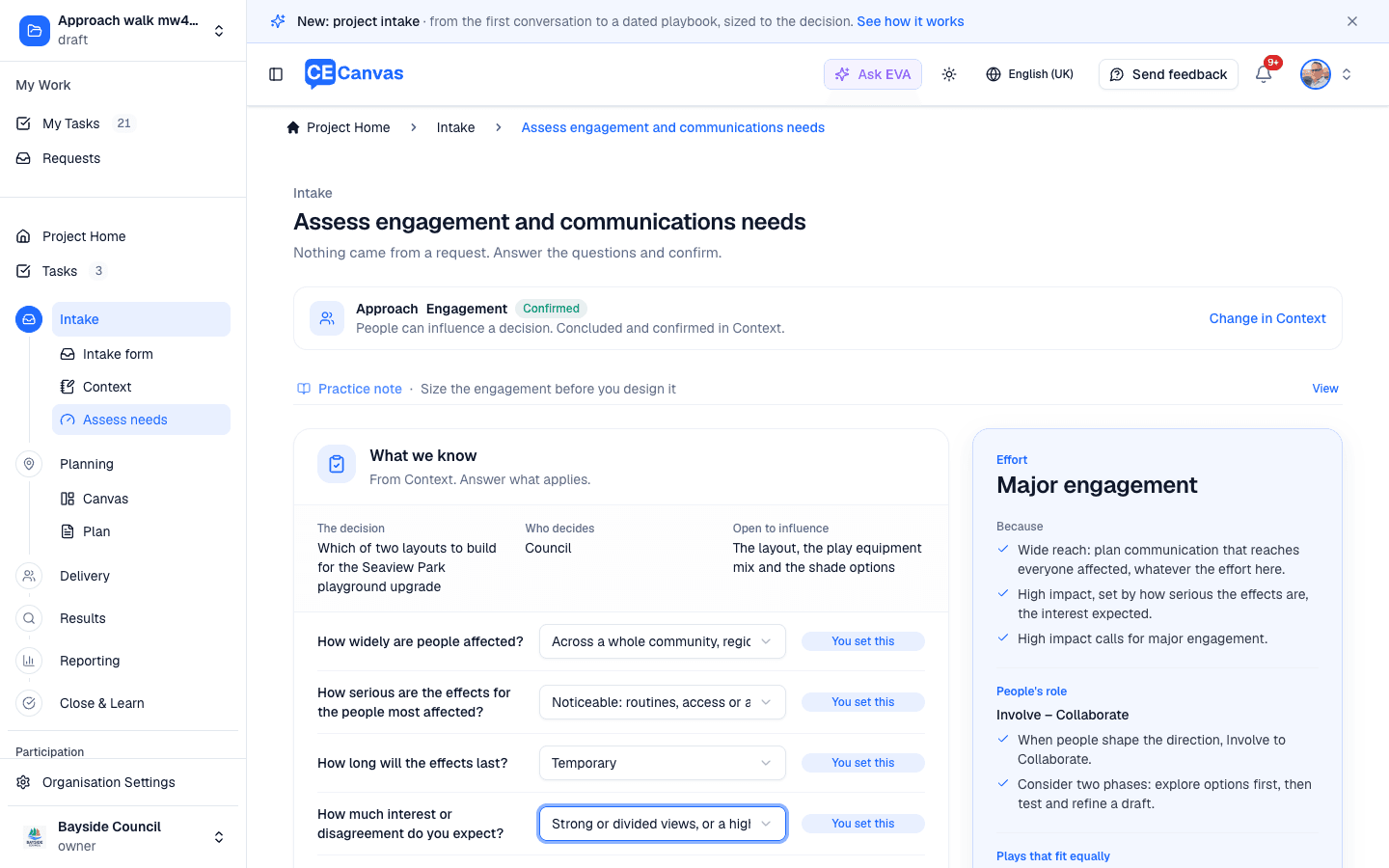
What the page starts from
Approach — the line at the top says whether this is an engagement or communications-led project and that it was concluded and confirmed in Context. The page never asks it again; Change in Context takes you back if it is wrong. While the approach is unresolved, the effort still reads as likely and you can save a provisional sizing, but the role and the play wait.
What we know — the decision, who decides and what is open, straight from Context. Blank facts make the sizing provisional until they are filled.
The questions — each pre-filled from the request where one exists and marked with its source (From the request, You set this, Needs an answer):
- How widely are people affected? Think of people, not only places: an internal change can reach a whole organization.
- How serious are the effects for the people most affected?
- How long will the effects last?
- How much interest or disagreement do you expect?
- Does law or policy require anything of this project? If it does, What does it require? asks whether that is people’s participation or notice to the people affected. Notice alone is what a communications-led project does, so it never conflicts with one.
- How much can people genuinely influence? (engagement projects only) Details, a meaningful part, a lot (they shape the direction), or Delegated (they make the final decision).
Which stage is this project at? appears too when your playbook’s project types declare stages, so a rezoning and a development application are not mistaken for each other.
Every answer is kept as you give it. Refresh, come back tomorrow, hand it to a colleague — the answers are there.
How it is sized
Effort is severity-led. Serious effects on even a few people are high impact on their own. Strong or divided interest, or wide and lasting effects, lift the band. Wide reach alone calls for broad communication, not more engagement. The result reads Light, Standard or Major with its because lines.
People’s role (engagement projects) follows what people can genuinely influence: a say on details reads Consult, a meaningful part reads Consult to Involve, shaping the direction reads Involve to Collaborate and suggests two phases, explore options first, then test a draft. A delegated decision reads Empower on its own. Check your organization allows delegating it, and record who delegated it in Context.
Adjust the sizing lets you move the effort band or choose one to four phases. A change from the suggestion asks for a short reason, which is recorded with the decision.
How we sized it opens the full reasoning and the timing it suggests. Each figure says where it comes from: advance notice and the response period come from the play when your playbook sets them, else Your organization’s framework, else the CE Canvas defaults; the engagement window is the play’s own limit. A statutory response period recorded under Obligations replaces the suggested one and reads Required response period, from Statutory requirement.
Your organization’s framework. Some organizations size engagement by their own rules, and CE Canvas sets those up with you at onboarding. Assess needs then uses your names beside the effort (High need in your organization’s framework), your minimum notice and response periods, and Leads: who leads at that level. A level your organization reserves is never suggested: the range steps down and says why (Your organization reserves Empower: …). Ask CE Canvas to change these.
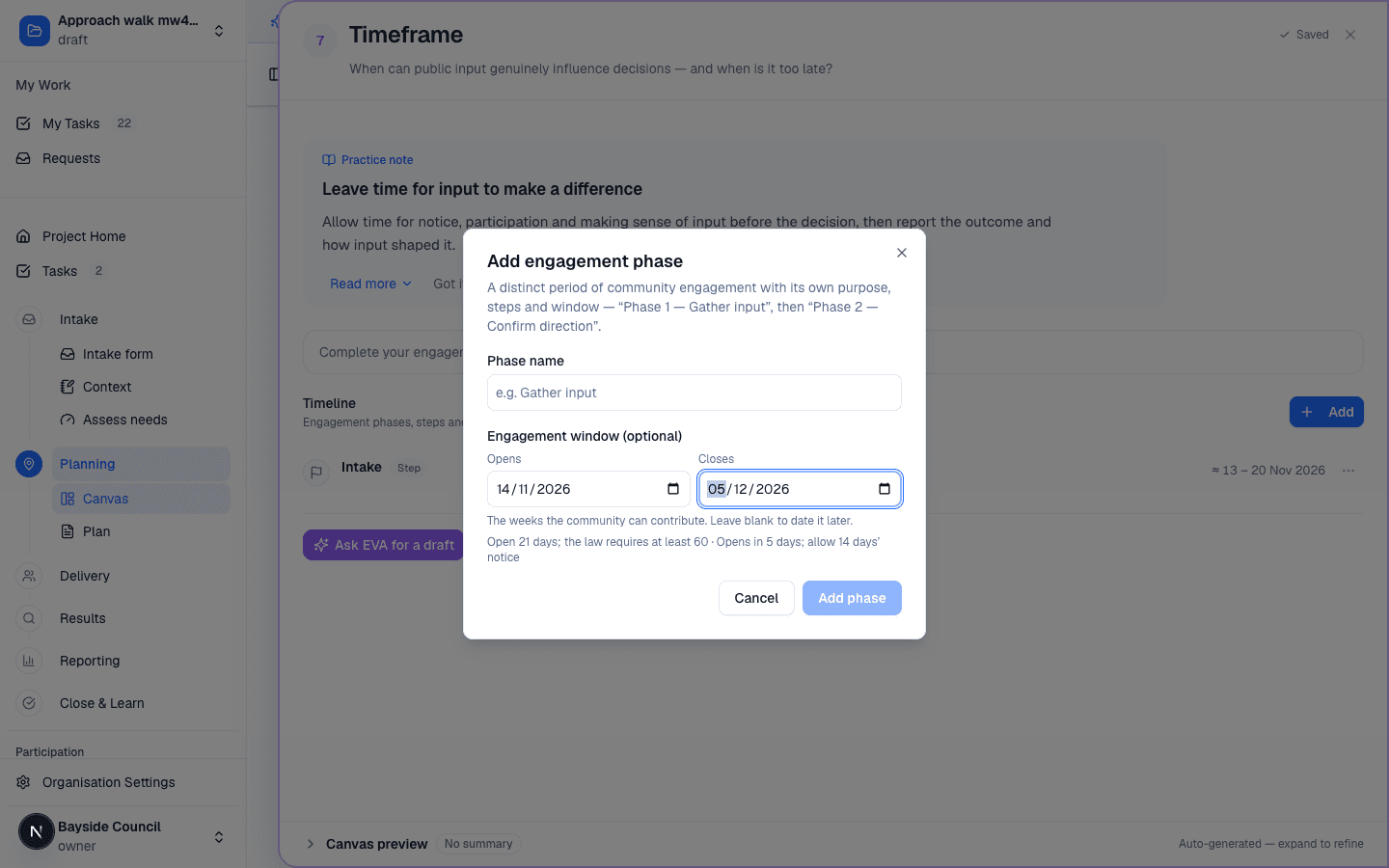
The minimum periods carry through the project. EVA plans the timeframe around them, and wherever an engagement window is dated (adding or editing an engagement phase on the Timeline, the window step when applying a play, and the phase overview on Delivery), a quiet line notes a window that opens too soon or closes too early. The note is for review and never blocks a date.
Obligations
Four obligations are reviewed on every project: accessibility and participation needs, Indigenous rights and protocols, statutory requirements, and reporting back to participants (engagement projects only). Each is Not reviewed until you set it to Open, Resolved or Not applicable. Where the request names people strongly affected or hard to reach, or says legislation applies, the item says so as a prompt to look, never as a verdict.
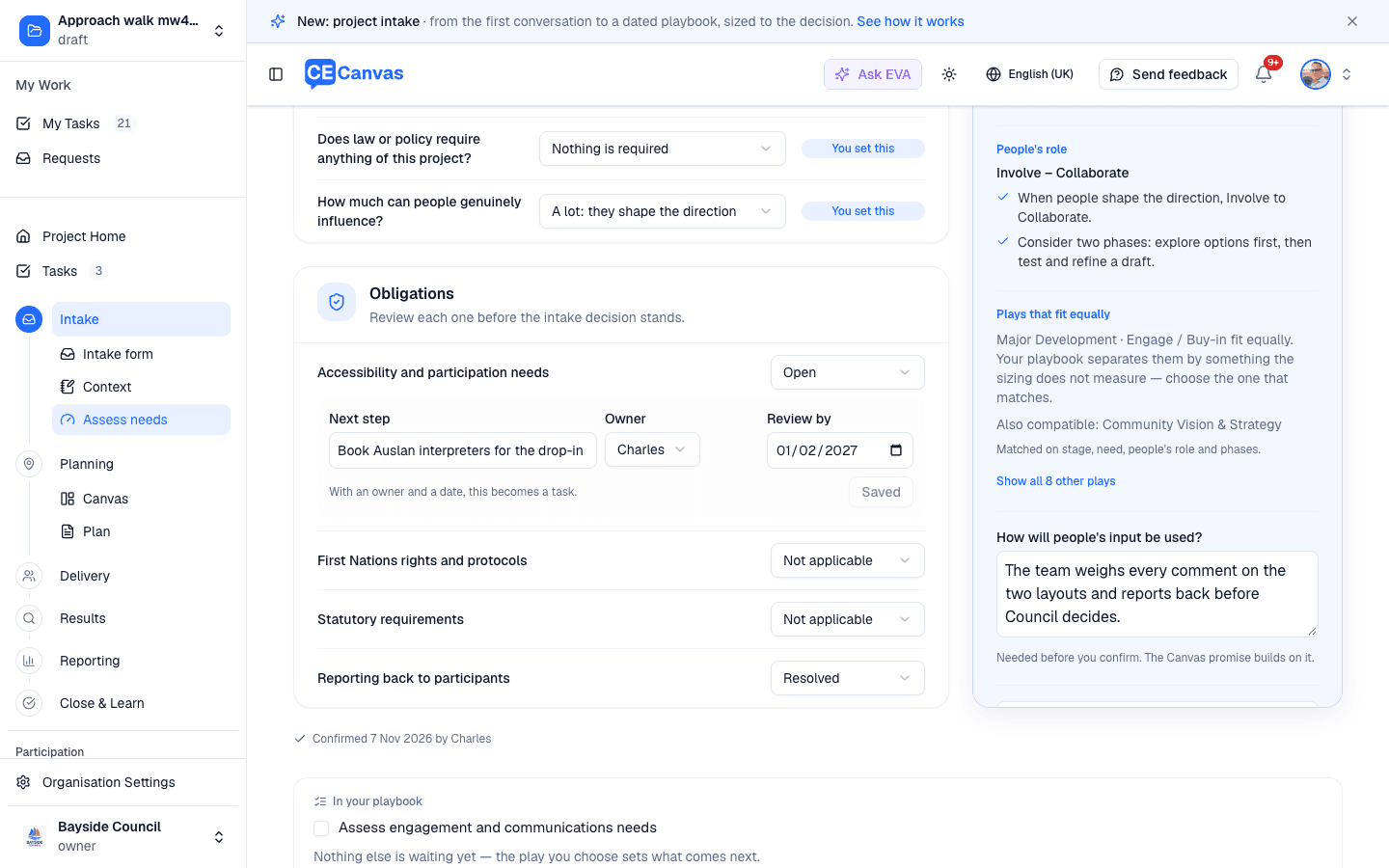
An open obligation needs a next step. Give it an owner and a review by date and it becomes a task in the project’s work, so it is followed through rather than remembered. Resolving it, or marking it not applicable, completes that task.
Statutory requirements that are open or resolved also take an optional Required response period: the minimum number of days the law says each engagement window stays open. It is binding: it overrides the play, your organization’s framework and the CE Canvas default everywhere those periods appear, including EVA’s drafts and the plan. Leave it blank when the requirement is about notice or reporting rather than how long people have to respond.
Until every obligation has been looked at, the sizing can only be saved as provisional: an obligation nobody has reviewed could still change the approach, the promise or the timing. A known obligation with an agreed next step can stay open; it is planning work, not a reason to hold the decision.
Plays
Where your organization has a playbook, the rail lists the plays that fit. A play fits when its participation level sits in the suggested range and it is not for a different stage. Among those, a play for the chosen stage comes first, then one declared for the assessed need, then the phases the sizing suggests, then the lowest level that still fits. A single fit is named; several that fit equally are offered as a choice; other compatible plays are listed beside them.
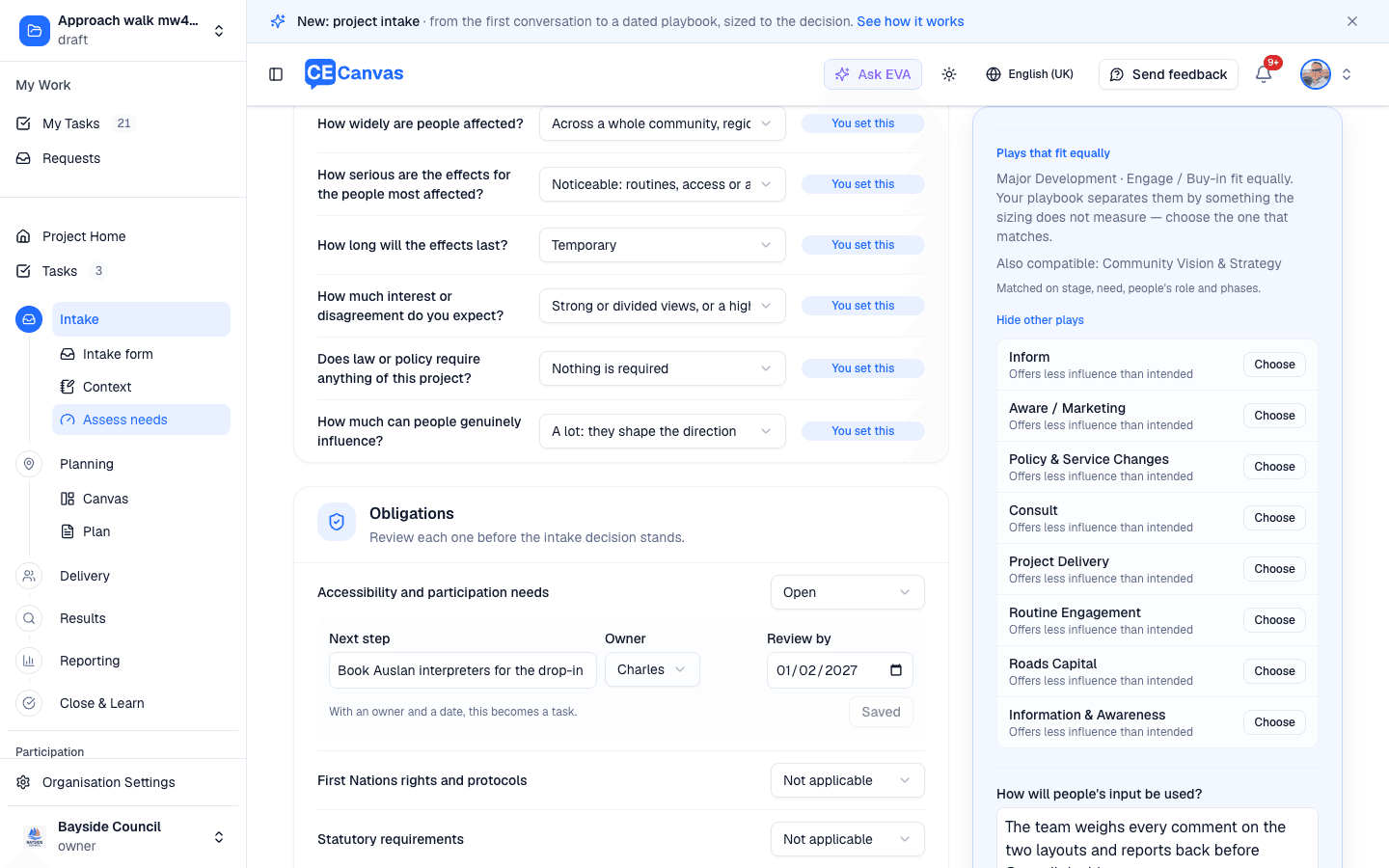
Show all other plays lists every other play in your playbook with how it differs: Offers more influence than agreed, Offers less influence than intended, or For another stage. Nothing in your playbook is hidden, but nothing outside the sizing is presented as a fit. Choose one anyway and the rail says the play changes what people are offered: revise what is open in Context, or say why it suits. The reason is recorded with the decision. When no play fits, the list opens on its own.
How people’s input will be used
Before an engagement’s play is confirmed, How will people’s input be used? asks for the commitment in a sentence: what the team will do with what people say, and when they hear back. It is the floor the play must honor, so the play you pick never sets the promise for you. The Canvas promise builds on it.
Confirming the decision
Confirm intake decision records the sizing as the project’s intake decision and, where a play is chosen, sets that play up on the project straight away and opens Project Home: its steps, gates and tasks are there, dated once the engagement window is (see Applying a Playbook). If the project already has a different play, playbook setup opens instead. With no playbook, confirming is the whole decision: the Assess task closes and the Canvas opens.
The recorded decision shows on the page afterwards with who confirmed it and when. If Context changes underneath it, the page offers Re-confirm sizing; if the play was already applied, Change project type goes to playbook setup.
Save provisional sizing is offered instead while the approach is unresolved, core facts are blank, or obligations are still to review. A provisional sizing is a likely effort, not a decision; nothing downstream treats it as one.
What the sizing drives
A confirmed sizing is not a note to re-read; the rest of the project starts from it.
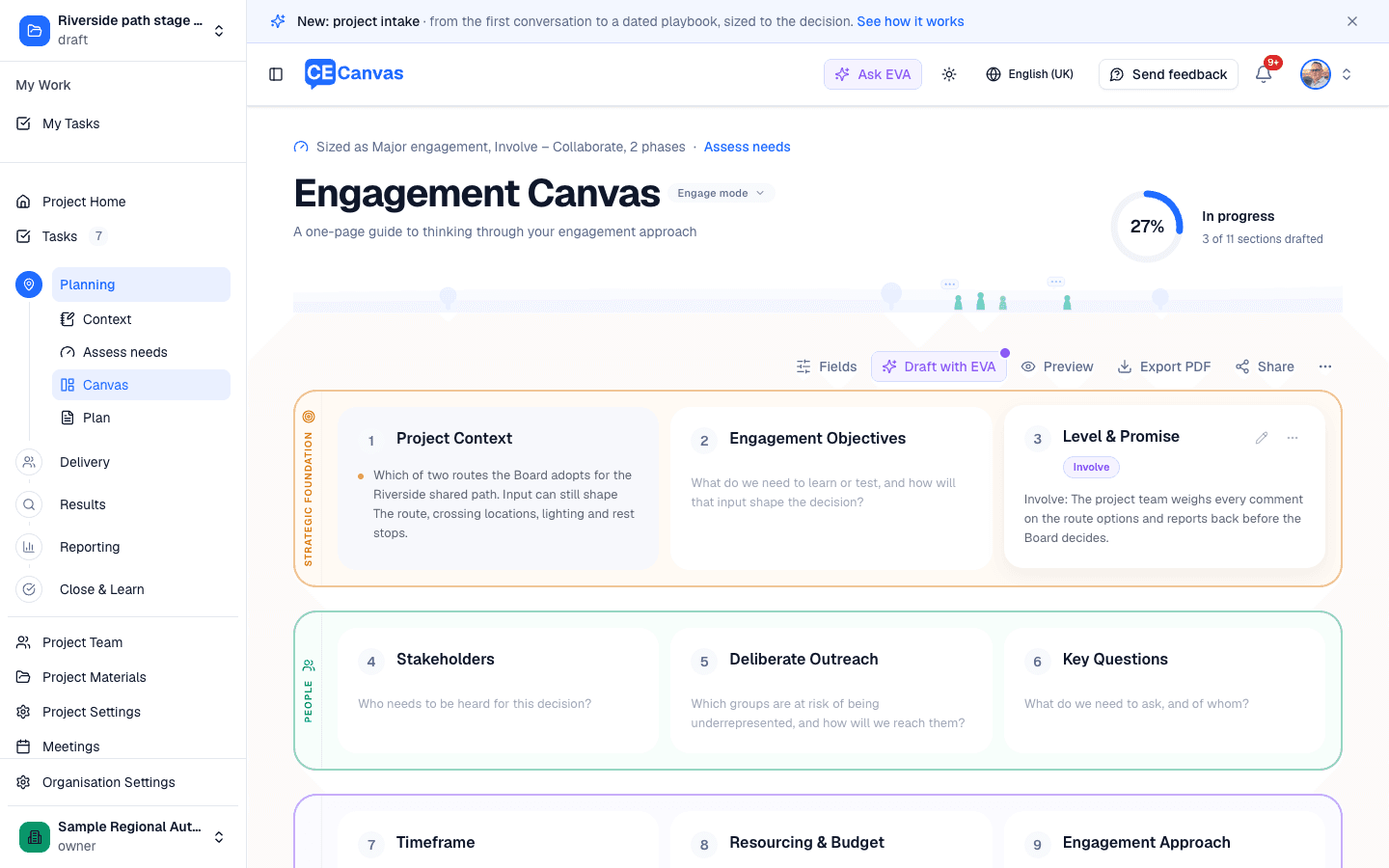
- The Canvas shows Sized as Major engagement, Involve – Collaborate, 2 phases above its title, linking back here. Level & promise opens on the level the sizing concluded, with your answer to How will people’s input be used? as its first promise. A level or promise someone has already written is never replaced.
- EVA reads the sizing when it drafts Canvas sections and plan content: the effort, people’s role, the phases, the reasons, the commitment and any open obligations. It sizes its drafts to them and does not offer more influence than the role stated.
- The phases, where no playbook sets them: the project’s first confirmed sizing adds the engagement phases it calls for (a second one is named Test and refine), so Delivery and the timeline show them and the CE Canvas tasks date themselves around the last window. If the sizing changes later, Assess needs offers Add the missing phases rather than changing the plan for you. Phases are never removed.
Without a playbook
Assess needs still sizes the effort, the role and the phases, reviews the obligations, and confirming closes the step and opens the Canvas, already set from the sizing as above. See the no-playbook example.