Engagement Canvas
The Engagement Canvas is your project’s strategy on one page. It captures the reasoning behind the engagement — what decision is being made, what influence is honestly on offer, who must be heard, and how you’ll prove input mattered — before any sessions are designed or tasks assigned.
It maps directly to the Decision Foundations and Engagement Design steps of the 10-step engagement sequence.
If you skip this: delivery starts from a method list instead of a strategy. Teams run the sessions they always run, for the audiences easiest to reach, and discover at reporting time that nobody can say what the engagement was for.
Accessing the Canvas
From the project sidebar, go to Planning → Canvas, or follow the primary action on Project Home when it reads Continue canvas.
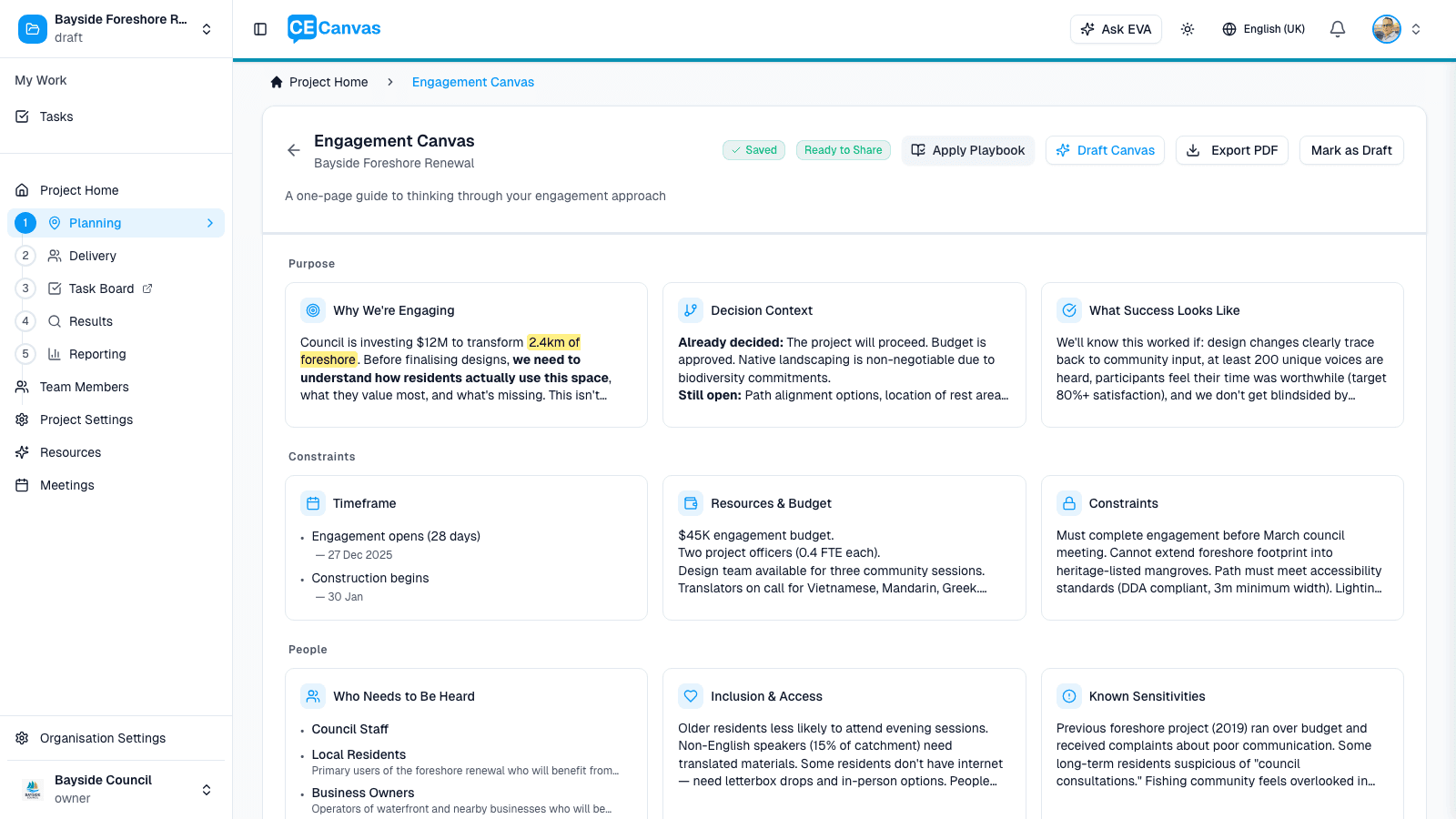
The header shows the mode chip (Engage mode — see Communications mode below), a progress card tracking sections drafted, and the canvas actions: Draft with EVA, Preview, Export PDF, and Share.
The sections
The canvas is organised into three colour-coded groups. Eleven sections show by default; work top to bottom — each group creates the conditions the next one requires.
Strategic Foundation
| # | Section | The question it answers |
|---|---|---|
| 1 | Project Context | Mirrors your Project Context surface — the decision, what’s open, what’s fixed. Read-only here; it keeps the canvas anchored to the real decision space. |
| 2 | Engagement Objectives | What do we need to learn or test, and how will that input shape the decision? |
| 3 | Level & Promise | What level of influence is being offered, and what is the promise? (IAP2: Inform → Consult → Involve → Collaborate → Empower) |
Level & Promise is a commitment, not an aspiration. Choose the level your decision space and resources can honestly deliver. A “Consult” delivered well builds more trust than an “Involve” delivered as consultation.
Under the level and the promise, the section carries the promise’s terms: how participation should feel, and how you close the loop. Both are part of what you are promising participants, so they sit with the promise rather than in a section of their own. If the tone you describe reads as co-design while the level says Consult, the section says so.
People
| # | Section | The question it answers |
|---|---|---|
| 4 | Stakeholders | Who needs to be heard, and whose absence would make this engagement incomplete? |
| 5 | Deliberate Outreach | Which groups are at risk of being underrepresented, and how will we reach them? |
| 6 | Key Questions | What do we need to ask, and of whom? |
The Stakeholders section on the canvas asks one thing — who needs to be heard for this decision? — and there are two ways in. If you already have stakeholders, add them right there (Add stakeholder opens a row in place; Paste several takes one group per line) and review coverage. If you’re not sure who to include, the stakeholder mapping tool is offered beneath the list — as a full invitation while the section is empty, a quiet “Want to check your stakeholder map?” once groups exist, and a single “Map reviewed” line after review. It is its own page under Planning (the current step is in the URL, so a link lands on List, Map or Review directly) that opens on whichever step needs attention. It is one stakeholder map, improved through five ways of thinking about it: List — who might matter? (an empty list first explains what a stakeholder is and isn’t, and why it is fine to start with who you know today); Refine — are these groups specific enough to plan for? (only groups with a name finding ask for attention: Edit or Keep as is); Map — how affected are they, and how much influence do they have?; Reach — who might standard engagement miss? (mark a group for deliberate outreach, then say why and what could help, in place); Review — is the map ready to shape the plan? (a readiness summary with counts, four checks and any open findings). Each step asks only for what it is about, and Get suggestions offers EVA’s help where it is useful. Experienced teams can Exit workshop for the plain list. Flag any group standard engagement methods are unlikely to reach as needing deliberate outreach; barriers and reach context appear only for flagged groups, so a standard-reach group needs nothing more than a name, why it matters and a placement.
Key Questions is where the plan says what the engagement actually asks. Best practice puts it here, straight after the stakeholder map and before you choose any method or tool: you write the questions for the groups who need to answer them, then pick the activity and tool that can reach those people with those questions.
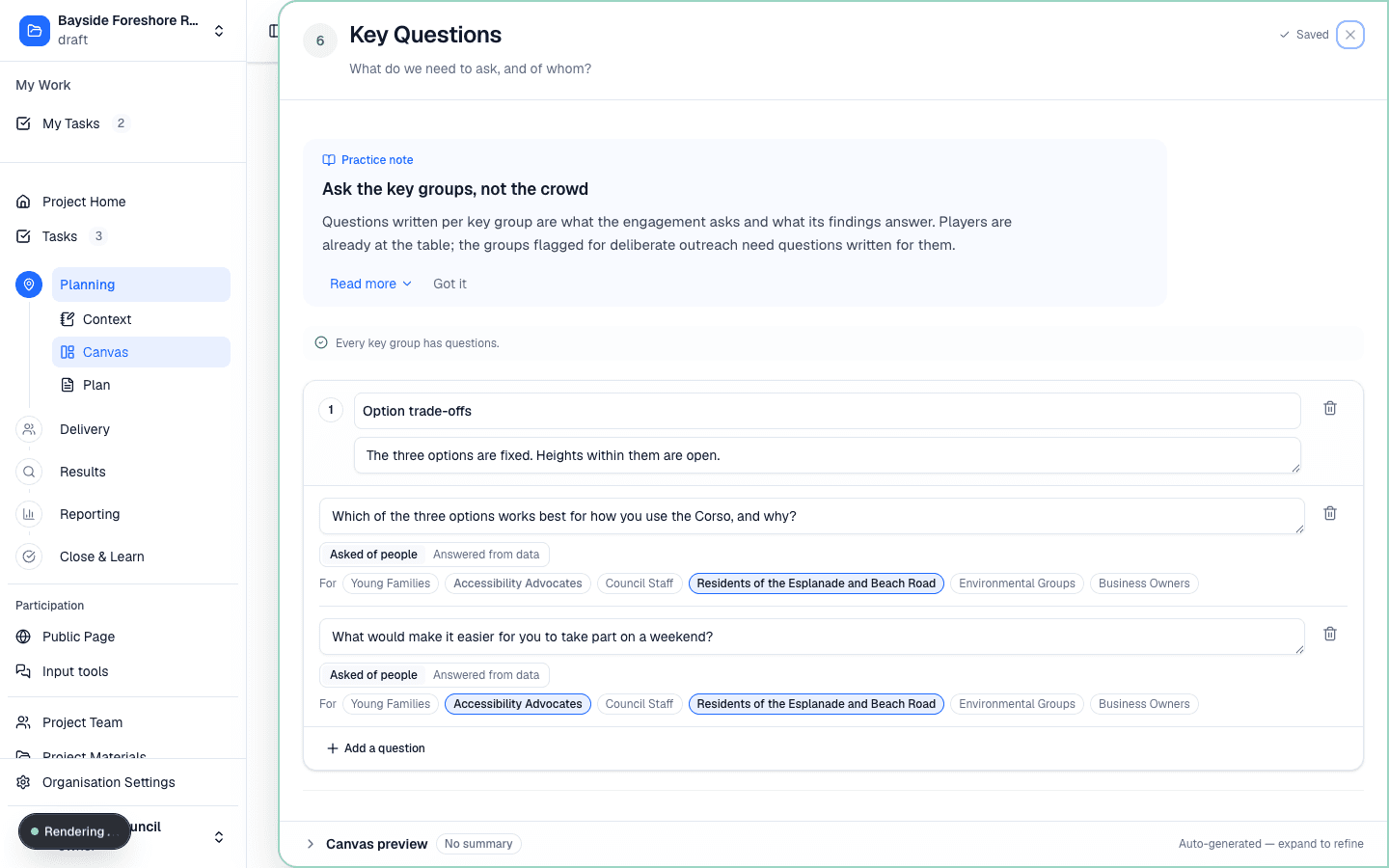
Work in topics. A topic is one thing the decision is still open on — give it a short title and, optionally, one line saying what is already decided and what is open. Under it, write the questions in the words a participant would answer, not the objectives restated. Each question carries two things:
- Who it is for. Tag the stakeholder groups the question is meant for. New questions start tagged to your key groups — the ones with high impact and high influence, plus every group flagged for deliberate outreach — and you can change that per question. A question with no groups tagged is asked of everyone the plan reaches.
- Whether it is asked at all. Asked of people is the default. Mark a question Answered from data when it is something your team will answer from records, counts or an expert rather than by asking the community. Those questions stay on the plan and never turn into survey questions.
A line above the topics tells you whether every key group has a question of its own, and the stakeholder coverage review raises a finding for any deliberate-outreach group you have not written a question for. Ask EVA for a draft proposes topics and questions from your objectives and your stakeholder map; nothing is written until you accept it, and EVA only ever tags groups that already exist on your map.
Key questions flow through the rest of the plan. In Engagement Approach each activity says which key questions it asks. In Delivery the activity shows those questions on its Details tab. And in Input tools a survey, map or conversation created from the plan starts from these questions, with your wording already in place — a tool created for an activity starts from just the questions that activity asks.
Placing groups on the map
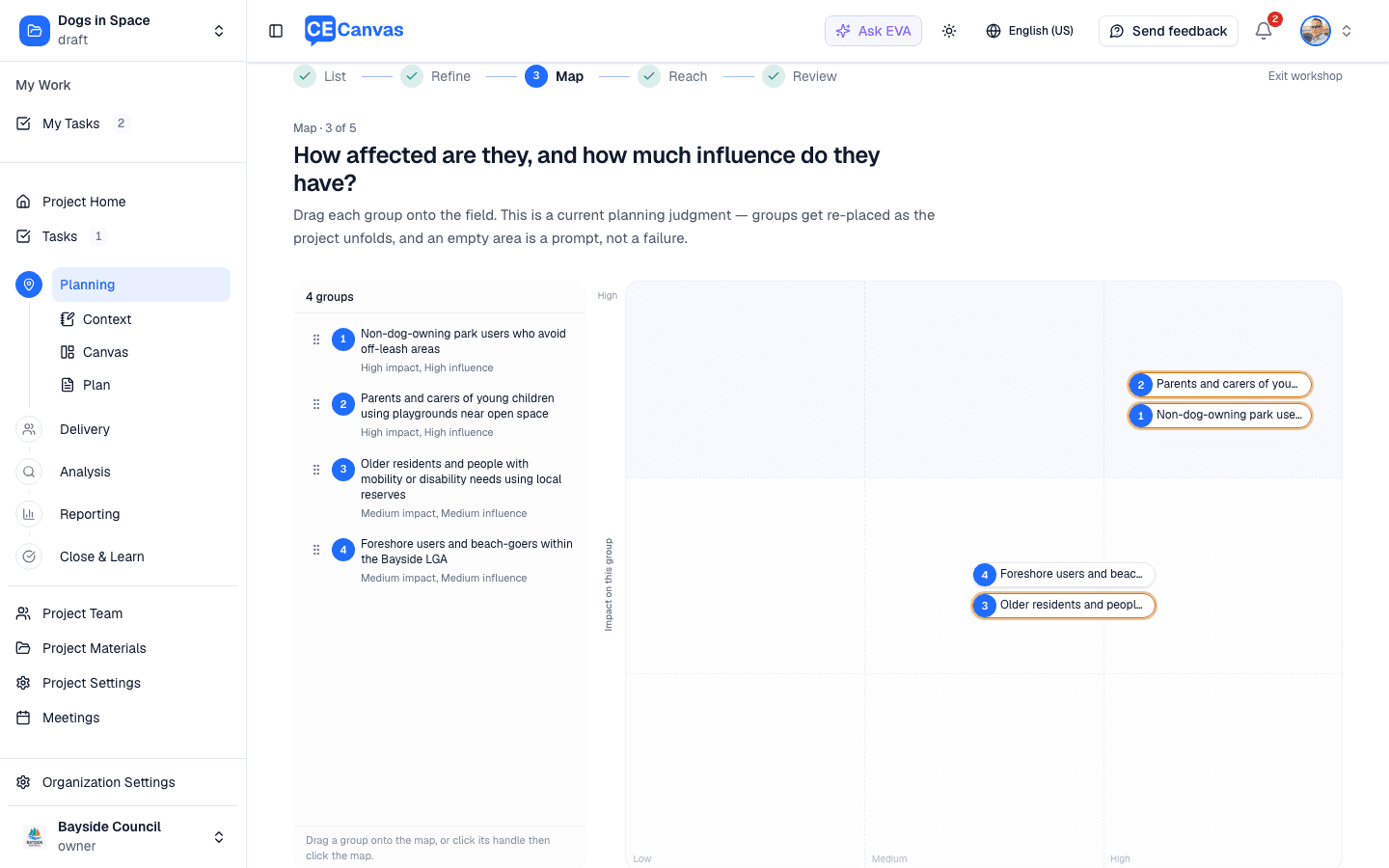
Adding a group to the list does not place it. Placement is a separate, deliberate act, and a new group stays marked Not placed until you do it.
The list beside the map is split in two — to place and on the map — and the two behave differently, on purpose.
To place. The group has nowhere else to live yet, so the row is the thing you drag: take it anywhere on its row and drop it on the map. If dragging is awkward, a single click on the row picks the group up instead — the row highlights and the map shows a crosshair — and your next click on the map places it.
On the map. The group has a marker now, and the marker is its handle: drag it to move the group, or drop it back onto the list to clear the placement. Clicking the row in the list finds the group instead, highlighting its marker so you can see where it sits. That is why a placed row cannot be dragged from the list — one group, one handle.
In either state, clicking a group’s name opens its controls, where you can set impact and influence exactly rather than by eye, write why the group matters, and flag it for deliberate outreach. This is how to place a group without dragging at all.
The line at the top of the list, under the group count, says which of these applies: while anything is still to be placed it explains dragging onto the map, and once everything is placed it switches to finding and moving.
What the two axes mean: impact — how significantly this decision could affect the group — runs bottom to top, and influence — how much they can affect the decision or its delivery — runs left to right. There are no boxes to choose between. The band a group lands in (low, medium or high on each axis) is what the plan records.
Every group is listed beside the map, numbered to match its marker, with its current band. Present shows the map alone, full screen, for a projector — from the section header, or the expand control on the map itself.
Every route into the map — direct entry, EVA suggestions, or the five-step mapping tool — ends at the same coverage review. It checks for names too broad to plan against, likely duplicates, unplaced groups, a map with no substantially affected group, outreach that has not been considered, and flagged groups without a way to reach them or without an activity that reaches them. Each finding offers Fix or Continue anyway; acknowledged gaps stay on record, and only two findings ask for a written reason. An empty map cell is a prompt for reflection, never a defect. EVA’s suggestions propose a placement and an outreach flag, labelled as suggestions, and nothing is written until you apply a row.
The groups you map here flow through the entire product — the audience shown on each activity in Delivery, activity targeting, and the Results coverage view all trace back to this section.
If the project has a mapped engagement area and a community profile, Area evidence to review appears in Stakeholders and Priority Groups. It highlights material census patterns as a coverage check. You can add a suggested group for review, mark the evidence considered, or record that it is not relevant. Nothing is added automatically.
Area evidence can support a group’s rationale and prompt a review of barriers or reach. It does not determine whether a group is interested, influential, supportive or opposed, and it cannot identify decision authorities, rights holders, traditional territories or consultation obligations. Confirm those judgements from the project and community context before completing the stakeholder map.
Phases and milestones both live on the canvas. The Timeframe section manages the same phases and milestones Delivery and the Timeline use — one shared structure, several doors. Phases named here (or created inline on an activity in Engagement Approach) become real delivery phases: each one holds its activities in Delivery, and every task created for those activities — manually or via EVA’s task suggestions — inherits the phase automatically.
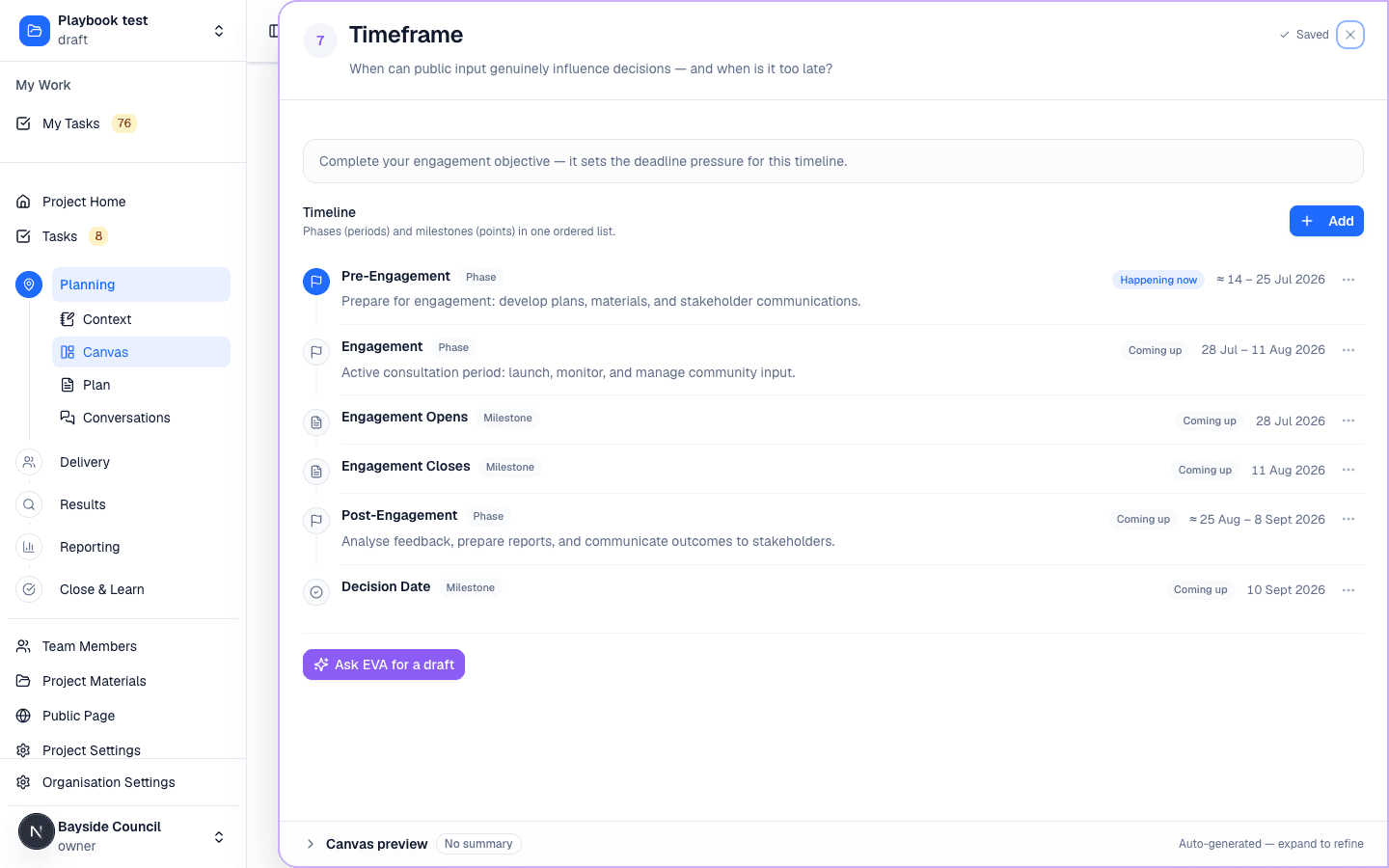
The Timeframe timeline is one chronological list: phases (periods) and milestones (points) in the order they happen, each labelled with a Phase or Milestone chip and a calm status (Coming up, Happening now, Done). A phase without its own dates still shows when it effectively runs — a range marked ≈, rolled up from the dated tasks and activities inside it. Set explicit dates whenever you want to firm the window; Needs date appears only when a phase has nothing dated at all. Drag rows to adjust the order of anything undated; dated entries keep their chronological position.
Delivery
| # | Section | The question it answers |
|---|---|---|
| 7 | Timeframe | When can public input genuinely influence decisions — and when is it too late? Manages both milestones (the dated decision moments) and delivery phases (the named stages the engagement moves through). |
| 8 | Resourcing & Budget | What budget, staff and internal support does this engagement have, and what constrains it? |
| 9 | Engagement Approach | What overall approach fits the objective, barriers, level of engagement, and timing? Each activity can be assigned a delivery phase here — pick an existing phase or create a new one inline — and shows its phase and delivery schedule once they’re set. |
| 10 | Evidence of Influence | How will we show that community input shaped the decision? |
| 11 | Closing the Loop | How and when will participants hear what happened to their input? |
Closing the Loop is the most consistently skipped commitment in engagement practice. Filling it in at the planning stage — before delivery begins — turns “we should get back to people” into a documented promise with a date. See Close & Learn.
Closing the Loop is deliberately the last block on the canvas. Nothing follows the promise to report back, because nothing should: it is the plan’s final commitment.
Optional sections can be shown or hidden per project from Fields, and each appears in the group it belongs to rather than in a separate area. Resourcing & Budget is on by default — the cost and capacity picture decision-makers expect on a plan on a page. Why are we engaging? joins Strategic Foundation, Key Messages joins People directly after Key Questions (what we tell participants sits beside what we ask them), Participant Experience also joins People, and Reach & Channels and Risk Assessment join Delivery, when a project needs them.
Participant Experience is off for new projects. How participation should feel and how you close the loop are now part of the promise’s terms in Level & Promise. Projects that had already written into Participant Experience keep it switched on, and anyone can turn it back on from Fields.
Resourcing & Budget captures an engagement budget band (low to very high — a rough band, never a figure), a short staffing capacity note, and free-text resources and constraints. Setting the band makes EVA’s method suggestions budget-aware: methods beyond the band aren’t suggested as activities, and the trade-off is named honestly rather than hidden. Detailed line-item budgets stay in the formal Engagement Plan document’s Budget section.
Risk Assessment is optional and covers risks to engagement delivery rather than replacing an organisation’s corporate risk register. For each risk, record causes and consequences, set the Before treatment likelihood and consequence, add the mitigation or treatment, then set the After treatment ratings to show the remaining risk. You can enter these risks yourself, ask EVA for a reviewable draft inside the section, or include the section in a whole-canvas draft. Ratings are calculated consistently and compatible plan risk tables draw from the same records.
Working in a section
Click any section to open its workspace. Each section offers:
- A focused editor for the section content — type directly, or use the section’s EVA actions to draft and refine
- Guidance for what the section needs to cover, with quality checks on the content
- A live canvas preview so you can see the one-page result forming
Content saves automatically.
Drafting with EVA
Per section — every section has inline EVA support that drafts from your Project Context, uploaded materials, what’s already on the canvas and, where relevant, the current area-demographics profile. Demographic evidence is supplied directly as current project context rather than retrieved from an uploaded document, and EVA keeps the source year and comparison geography with any suggestion it informs.
Two sections draft real structure, not just text. Timeframe proposes phases (periods, like an engagement window) and milestones (decision moments) together; drafted phases merge into any existing phase with the same name — a playbook’s phases are updated, never duplicated or deleted — while milestones replace the previous drafted set. Engagement Approach links each drafted activity to an existing phase, its target stakeholder groups, and dates when your Project Context supports them — EVA never invents phases or dates it can’t ground.
When your Project Context doesn’t name engagement methods, EVA’s Engagement Approach draft suggests them from your organisation’s Engagement Library — matched to your objectives, promise level, flagged barriers and budget band, with the reason shown for each. Methods your declared platforms support rank higher; methods beyond your budget band are named as out of reach rather than drafted. When your materials do name methods, they win.
Whole canvas — Draft with EVA in the header opens a section picker. Each section shows its state — Already filled, Draft in its section, or Edit directly — and empty sections are pre-selected (use Select All Empty or Select None to adjust). Filled sections stay unchecked unless you opt in to have EVA replace them. Running it produces a connected first draft across the selected sections; a couple of table-backed sections (Stakeholders, Engagement Approach) are drafted only when empty and are otherwise managed directly. It’s a starting point for editing, not an answer: EVA cannot know what is genuinely open to influence in your community or what sensitivities exist. Review every section against reality before sharing.
The stronger your Project Context, the better the draft. A canvas drafted from an empty context is generic by definition.
Communications mode
If the project is classified as a Communications Project (see Project Context), the canvas switches to the Communication Canvas — ten sections built for inform-mode work: Project Context (read-only), Communication Purpose, Audiences, Access, Inclusion & Trust Risks, Message Architecture, Channels, Tactics & Messengers, Communication Timing, Transparency & Response, Issues & Enquiry Handling, and Evidence of Understanding.
The mode chip in the header shows which canvas you’re on. Switching modes follows the project classification — change the classification from the Project Definition card in Project Context, not by working around the canvas.
Why two canvases: asking “who needs to be heard?” on a project where decisions are already made invites a promise you can’t keep. The Communication Canvas asks the honest versions of those questions for inform-mode work.
Sharing and exporting
- Preview shows the formatted one-page canvas — populated sections (including Project Context) are auto-summarised into the one-page view
- Export PDF produces a snapshot to circulate outside CE Canvas
- Share marks the canvas as the agreed planning position for the team
The canvas remains editable in any state — sharing is a signal, not a lock.
Where the canvas flows
The canvas is the strategic source for everything downstream:
- Delivery — turns canvas activities into a phased workplan (“Generate your workplan” on Project Home)
- Engagement Plan — the generated formal document expands the canvas for approval and compliance audiences
- Results — coverage is measured against the stakeholder groups mapped in section 4
- Reporting — outcomes reports trace back to the objectives (3) and the evidence and closing-the-loop commitments (9, 10)
Next steps
- Project Context — strengthen the foundation the canvas draws from
- Delivery — turn the strategy into who does what, when
- Engagement Sequence Overview — the thinking behind the section order