Engagement Plan
The Engagement Plan is the formal document — for council approval, executive sign-off, compliance, or publication. It expands the strategy your team agreed on the Engagement Canvas into a full written plan, generated and refined with EVA.
From the project sidebar, go to Planning → Plan, or open it from the third card on the Planning hub.
The canvas leads, the document follows. Not every project needs the formal plan — for many, the canvas is the plan. Generate the document when an audience outside the team requires it, and treat the canvas as the source of truth the document expresses. A plan generated before the canvas is settled documents a strategy you haven’t agreed yet.
The plan editor
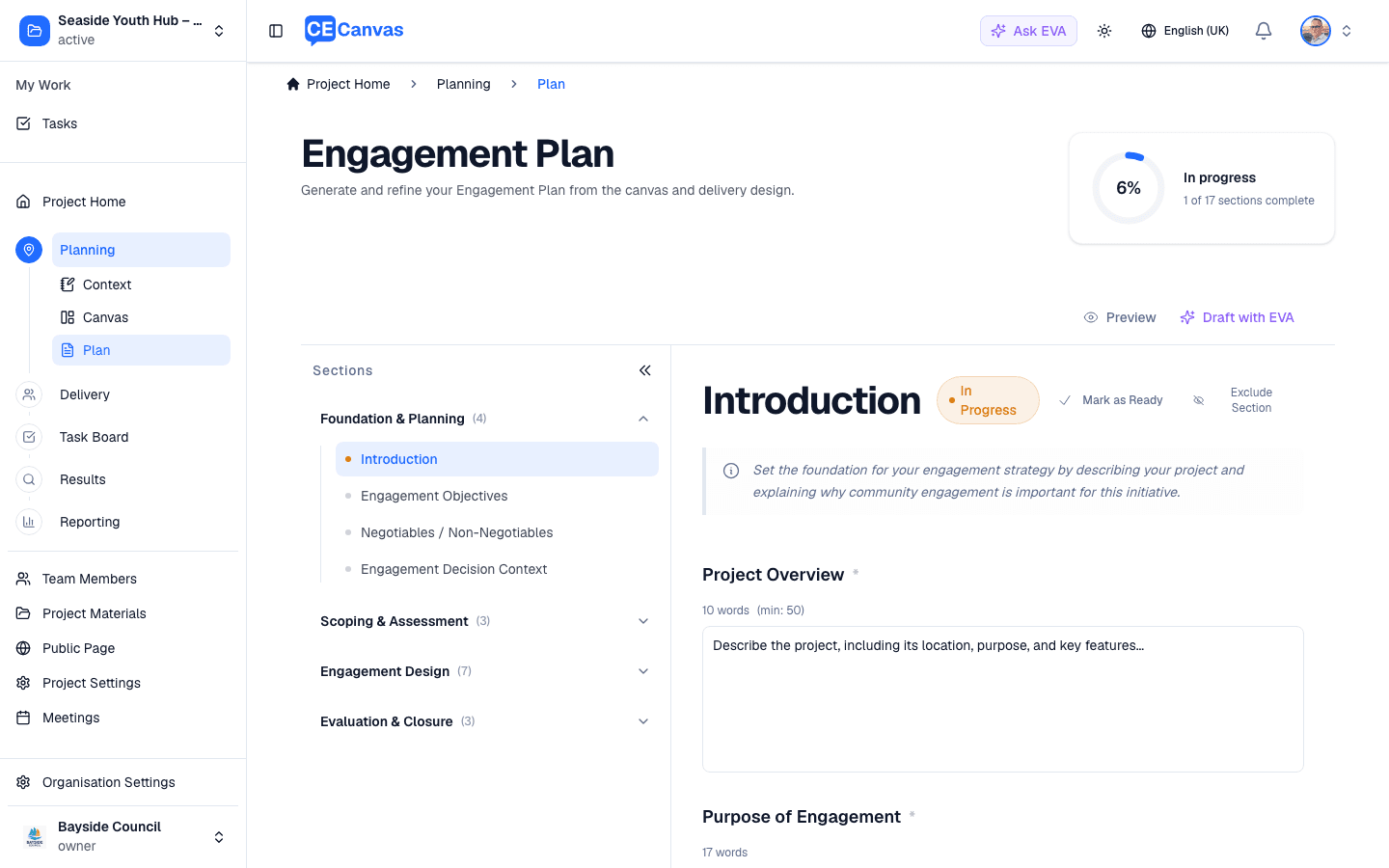
The groups and sections come from your organisation’s active Engagement Plan template, so exact names can differ. The default template organises the document into four section groups — work them in order, because later sections depend on earlier decisions:
| Group | Covers |
|---|---|
| Foundation & Planning | Introduction, Engagement Objectives, Negotiables / Non-Negotiables, Engagement Decision Context |
| Scoping & Assessment | The stakeholder landscape, participation barriers, and groups needing deliberate outreach |
| Engagement Design | Methods, channels, accessibility, timeline, participant experience, and resourcing |
| Evaluation & Closure | How success is measured and how the feedback loop will be closed |
Templates vary. Groups and sections follow the template your organisation has adopted — some rename the first group (for example, Project Foundations) or add sections beyond the default. Manage templates in Organisation Settings.
For each section:
- Field guidance describes what to capture, with word counts against a minimum target
- Draft with EVA generates content from your context, canvas, and project materials
- Mark as Ready signals the section is reviewed and final — the section locks against accidental edits until you click Edit, and the progress card counts it (progress is sections marked Ready over included sections, so excluding a section removes it from the denominator and an all-Ready document reads 100%)
- Exclude Section removes sections that don’t apply to this project
Content saves automatically. Use Preview to see the formatted document and export it when the sections are ready. Headings, numbered lists, links and tables that EVA writes render the same way in the editor’s read view, in Preview and in the exported PDF or Word file.
What deserves human attention
EVA can draft every section — but four of them carry the commitments that make or break the engagement, and they must reflect decisions only your team can make:
- Negotiables / Non-Negotiables — the document’s honesty test. If this section is vague, every promise in the rest of the plan is built on sand
- Engagement Decision Context — must match the Project Context decision space, not a more comfortable retelling of it
- The engagement level — the plan must promise the level the canvas committed to (Level & Promise), not upgrade it for a better-reading document
- Evaluation & Closure — dates and channels for closing the loop, specific enough that someone could check whether you did it
Keeping the plan current
When context or canvas changes — a constraint added, a milestone moved, a method swapped — the affected plan sections need revisiting. The document doesn’t auto-update: that’s deliberate, because an approved plan changing silently is worse than one that’s explicitly revised. Re-draft the affected sections with EVA, review, and re-mark them ready.
Next steps
- Engagement Planning — the hub showing all three planning surfaces
- Engagement Canvas — the strategy the plan expresses
- Delivery — where the plan becomes scheduled work