Working with EVA
EVA is the AI assistant built into CE Canvas. It helps you plan engagement, draft documents, and make sense of community feedback — always working from your project’s materials rather than general knowledge. This page explains what EVA can do, how to get the best out of it, and where its limits are.
EVA is an assistant, not a decision-maker. It drafts and suggests; you review, edit, and decide. Nothing EVA produces is saved or published until you act on it.
Where you’ll find EVA
EVA appears in a few different forms across the product. They share the same underlying assistant, tuned to the surface you’re on.
| Surface | What it does |
|---|---|
| Ask EVA (chat) | Ask questions about your project, the product, or your next step. EVA answers from your materials and the CE Canvas docs, and can help refine content conversationally. |
| Discover / Extract context | Point EVA at your uploaded materials (or your organisation’s public website) and it drafts your Project Context fields, with the source attached to each. |
| Draft with EVA — Canvas | Drafts Engagement Canvas sections — one at a time, or a bulk run across the sections you choose. |
| Draft with EVA — Documents | Drafts Engagement Plan and Reporting sections, with a confidence signal and source chips on each field. |
| Suggest tasks | Proposes the operational tasks needed to run an engagement activity. You review and select before anything is created. |
| Results analysis | Turns submitted results into themes, sentiment, and representative quotes. |
| Organisation briefing | On the Organisation insights tab, reads your cross-project engagement record for a named audience — Council, or executive leadership — and writes it up as a short briefing. Covers whatever the tab is currently filtered to. |
Chat commands
Type / in the EVA chat to open the command palette — a shortcut menu for the things EVA can do beyond answering questions. Use arrow keys and Enter (or click) to pick one.
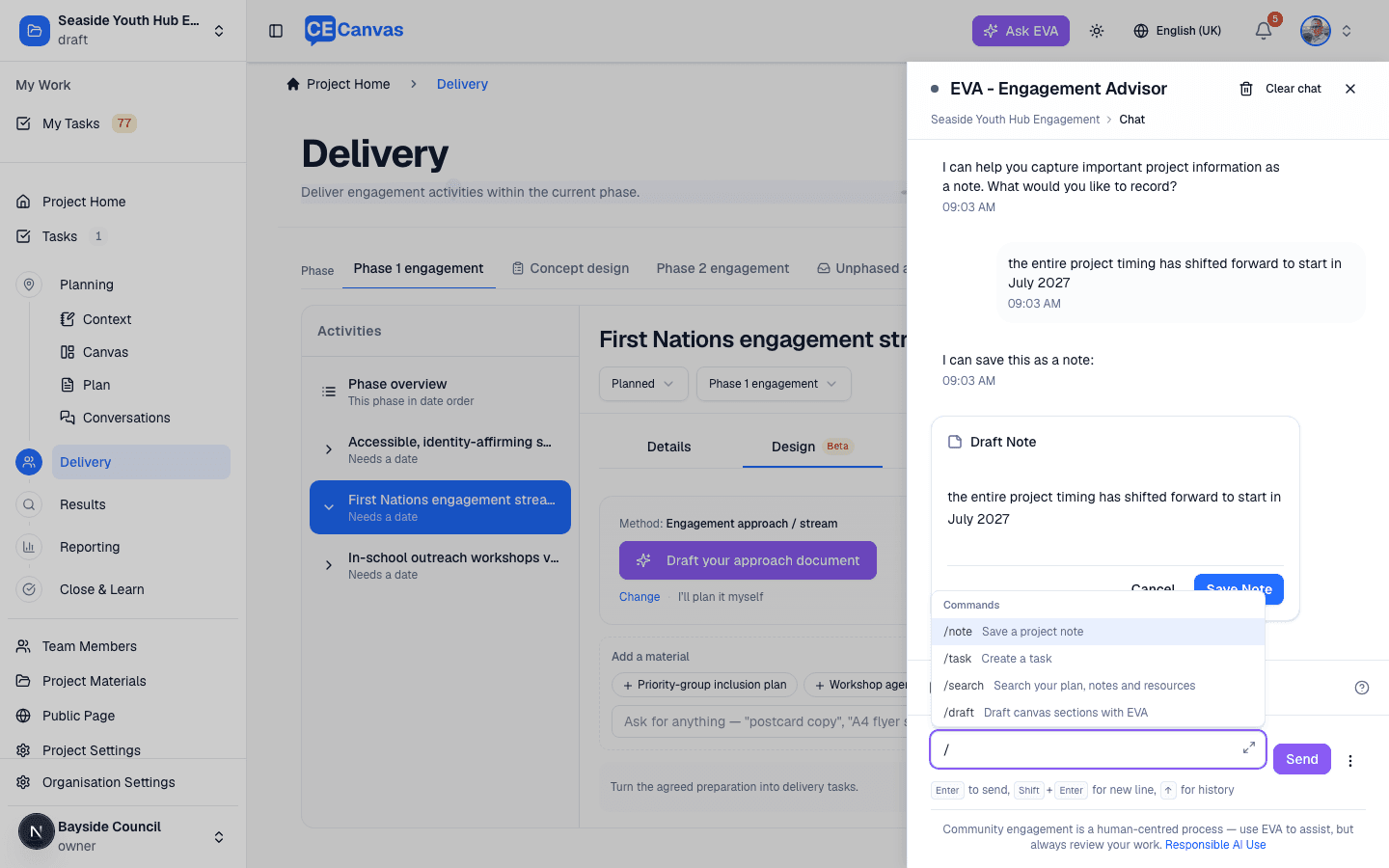
| Command | What it does |
|---|---|
| /note | Save a project note. /note on its own asks what to record — your next message becomes the note draft. /note followed by text drafts it immediately. |
| /task | Create a task, e.g. /task Book venue for community meeting. |
| /search | Search across your engagement plan, project notes and uploaded resources. |
| /draft | Start drafting canvas sections with EVA. |
Notes and tasks are always shown as drafts for you to confirm before anything is saved.
Voice input
Beta — enabled per organisation. If you don’t see a microphone in the EVA chat box, it isn’t turned on for your organisation yet.
The microphone button in the EVA chat box dictates instead of typing — useful for capturing a thought straight after a community session, or for longer prompts you’d rather say than type.
- Words appear in the chat box as you speak, and append to anything already typed there.
- Nothing is sent until you send it. Read the text back and edit it first — dictation mis-hears names, places, and technical terms, and EVA will work from whatever the transcript says.
- Select the microphone again to stop. Dictation also stops on its own once you send a message, or after a long silence.
- Speech is recognised by your browser, not by CE Canvas. Chrome, Edge, and Safari support it — the button doesn’t appear in browsers that don’t. Chrome sends the audio to Google’s speech service to transcribe it, so treat it as you would any other browser feature when handling sensitive material.
How EVA works — grounding
EVA doesn’t answer from a general-purpose memory. Before it responds, it retrieves the relevant facts from your project — uploaded materials, Project Context, canvas, plan, results — and from the CE Canvas product documentation, then works only from what it finds. This is called grounding, and it’s why EVA’s answers stay specific to your engagement.
Practical consequences worth knowing:
- Better inputs, better output. EVA is only as good as the context it can see. A thin Project Context or no uploaded materials means thinner drafts. Fill in context first.
- It won’t invent specifics. EVA is instructed not to fabricate dates, budgets, figures, or commitments. If your materials don’t support a fact, it will leave it out or tell you it isn’t certain.
- It shows its working. Drafts and answers carry source chips (what the content is based on) and a confidence signal so you can check the basis before relying on anything.
- It asks when it’s missing something. If key information is absent, EVA flags the field as needing input rather than filling the gap with a plausible guess.
- It links to the docs. When EVA answers a “how do I…” question about the product, it cites the relevant documentation page so you can read the full detail.
Getting good results
- Be specific. “Draft the stakeholder section for a coastal foreshore upgrade affecting three surf clubs” beats “write the stakeholders.”
- Give it the constraints. Tell EVA what’s fixed and what’s open. It cannot know your real decision space unless it’s in Project Context or you say so.
- Draft, then edit. Treat every draft as a first pass. Tighten the specifics, correct anything that sounds right but isn’t, and add the local knowledge only you have.
- Use one section at a time when precision matters, and the bulk “Draft with EVA” run when you want a fast first pass across many sections.
- Attach exemplars. Where supported, mention an existing document you want EVA to match for style and structure.
Where your judgement is always required
EVA can produce plausible content that is wrong, out of date, or missing local knowledge. These decisions must always be yours — see Responsible Use of AI for the full guidance:
- What is genuinely open to community influence (your decision space and non-negotiables).
- Stakeholder sensitivities and community history — prior tensions, cultural protocols, broken commitments. EVA has no way to know these.
- The engagement level you can honestly deliver (Inform, Consult, Involve, Collaborate, Empower).
- Commitments you make publicly — always review AI-generated content before it leaves your team.
What EVA can’t do
Knowing EVA’s limits keeps you from waiting on something it was never going to do. In short: EVA drafts and analyses inside your project — it does not take administrative actions, and it won’t answer confidently about things outside your materials or the product docs.
- It doesn’t publish, send, or delete anything, or change settings, billing, or permissions.
- It won’t invent facts it can’t ground — expect “I’m not certain” rather than a confident guess.
- It knows the projects in your account (those you can access). Asked at organisation level it can also draw on your organisation’s engagement record and materials shared across projects; opened inside a project it works from that project’s detailed context.
- It restates figures rather than calculating them. Organisation-level answers and briefings repeat the numbers already on the Organisation insights tab — EVA doesn’t total, average or project new ones, so anything it quotes should match a figure you can find on that page.
- It can’t tell you what participants said at organisation level. The cross-project record holds what was run and which themes were coded, not the comments themselves, so EVA won’t characterise community opinion from it. For what people actually said, open the project’s results.
For product limits (what CE Canvas itself can and can’t do yet), see What CE Canvas Can and Can’t Do. If something isn’t working the way you expect, see Troubleshooting.